
VGA Connector:Pin Configuration & Applications
A VGA connector (Video Graphics Array) is a type of video interface commonly used for transmitting analog video signals from a source device, such as a computer or graphics card, to a display device like a monitor. The VGA standard was introduced by IBM in 1987 as part of its personal computer graphics standard, and it became widely adopted for computer displays and projectors. Although it is now considered outdated in comparison to newer digital standards like HDMI and DisplayPort, VGA remains relevant for certain legacy systems and specific applications.
History and Evolution of VGA
The VGA standard was a significant advancement in the world of computer graphics, as it offered a resolution of 640×480 pixels with a 4:3 aspect ratio, a large improvement over previous standards. Over the years, VGA evolved to support higher resolutions and more colors. However, it remained an analog standard, which limited its performance compared to modern digital interfaces.
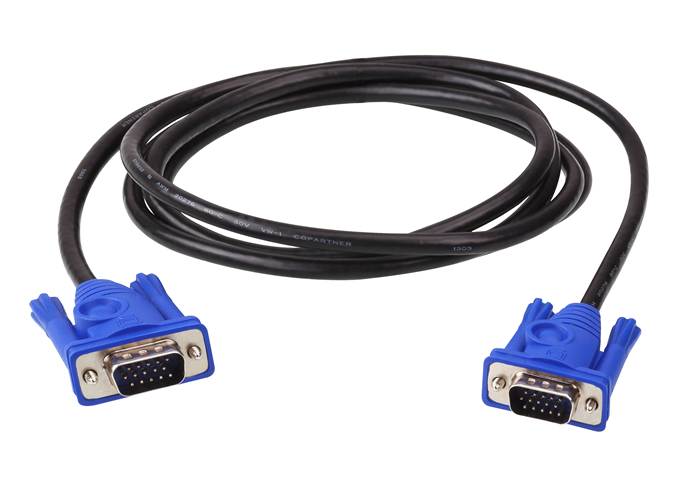
The VGA connector is characterized by its 15-pin D-shaped connector, commonly referred to as a DE-15 connector. It typically has three rows of five pins, with each row serving a different purpose in transmitting the video signal.
VGA Connector Pin Configuration
A VGA connector has 15 pins, which are used for transmitting a combination of red, green, blue (RGB) color signals, horizontal and vertical synchronization signals, and other necessary communication signals. Here’s a breakdown of the pin configuration for a standard VGA connector:
1. Pin 1: Red (Video Signal)
•Purpose: Transmits the red component of the video signal.
•Type: Analog signal.
2. Pin 2: Green (Video Signal)
•Purpose: Transmits the green component of the video signal.
•Type: Analog signal.
3. Pin 3: Blue (Video Signal)
•Purpose: Transmits the blue component of the video signal.
•Type: Analog signal.
4. Pin 4: Reserved
•Purpose: This pin is typically unused and is reserved for future standards or specific manufacturer requirements.
•Type: Not used in most applications.
5. Pin 5: Ground
•Purpose: Provides the ground connection for the signals.
•Type: Ground.
6. Pin 6: Red Ground
•Purpose: Provides ground for the red video signal.
•Type: Ground.
7. Pin 7: Green Ground
•Purpose: Provides ground for the green video signal.
•Type: Ground.
8. Pin 8: Blue Ground
•Purpose: Provides ground for the blue video signal.
•Type: Ground.
9. Pin 9: Reserved
•Purpose: Like Pin 4, this pin is reserved for potential future standards and is not often used.
•Type: Not used in most applications.
10. Pin 10: Sync Ground
•Purpose: Provides ground for synchronization signals.
•Type: Ground.
11. Pin 11: Horizontal Sync (HSYNC)
•Purpose: Carries the horizontal sync signal, which synchronizes the start of each horizontal line in the video frame.
•Type: Analog signal.
12. Pin 12: Vertical Sync (VSYNC)
•Purpose: Carries the vertical sync signal, which synchronizes the refresh of each frame in the video display.
•Type: Analog signal.
13. Pin 13: Monitor ID 2
•Purpose: Part of the plug-and-play feature that identifies the monitor to the computer.
•Type: Used for communication between the monitor and the computer.
14. Pin 14: Monitor ID 1
•Purpose: Used in conjunction with Pin 13 for the monitor identification process.
•Type: Used for monitor detection.
15. Pin 15: Display Data Channel (DDC)
•Purpose: Used for communication between the computer and the monitor, allowing for the exchange of information about the monitor’s capabilities.
•Type: Digital signal.
VGA Cable Construction
A VGA cable typically consists of a 15-pin male connector at both ends, which plugs into the VGA port of both the source device (such as a computer) and the display device (such as a monitor). Inside the cable, each pin is connected to a corresponding wire that transmits the video signals, with additional shielding to prevent electromagnetic interference (EMI). VGA cables can be quite long, but as the length increases, the quality of the signal can degrade, leading to lower resolution and visual artifacts. It is typically recommended to keep VGA cable lengths under 15 feet for optimal performance.
VGA Applications
Despite being largely replaced by digital interfaces like HDMI and DisplayPort, VGA connectors are still used in certain applications, particularly for legacy equipment, specialized monitors, and older projectors. Let’s look at some common applications of VGA connectors:
1. Computers and Laptops
•Early computers and laptops widely used VGA connectors to output video to external monitors or projectors. Many older computers and devices still rely on VGA connectors, especially in corporate environments that have not upgraded to newer digital standards.
2. Monitors and Projectors
•Many projectors and monitors still feature VGA input ports, as VGA was a common standard for years. VGA’s analog nature allows for compatibility with older equipment, making it useful in certain professional and educational settings.
3. Legacy Equipment
•Some industrial and scientific equipment still use VGA connectors for video output. This is especially true for legacy systems that have not been upgraded to newer digital interfaces due to cost or operational constraints.
4. Home Theater Systems
•While HDMI has largely replaced VGA in home theater systems, some older home theater projectors and monitors may still feature VGA inputs. For instance, vintage projectors may rely on VGA to interface with DVD players, gaming consoles, or personal computers.
5. Surveillance Systems
•Some security cameras and monitoring systems use VGA connectors to output video signals to analog monitors. This is less common today but is still found in older systems.
Advantages of VGA
•Wide Compatibility: VGA is compatible with a wide range of older computers, monitors, and projectors, making it valuable for legacy systems.
•Analog Signals: VGA transmits analog video signals, making it simple and cost-effective for lower-resolution applications.
•Availability: Despite the shift to digital connections, VGA connectors and cables remain widely available and are often less expensive than newer digital cables.
Limitations of VGA
•Limited Resolution and Bandwidth: VGA is an analog signal, which limits the resolution and color accuracy it can achieve compared to digital interfaces like HDMI and DisplayPort. The maximum supported resolution for VGA can vary, but it generally does not support the higher resolutions of modern digital standards.
•Signal Degradation Over Distance: VGA signals can degrade over long distances, causing visual artifacts, blurry images, or screen flickering. This is a significant disadvantage in environments where long cable runs are required.
•Lack of Audio Support: VGA transmits video signals only and does not carry audio, unlike HDMI, which can transmit both audio and video signals on a single cable.
VGA vs. Modern Video Standards
VGA has largely been replaced by digital video interfaces like HDMI and DisplayPort, which offer several advantages over VGA:
1.Signal Quality: HDMI and DisplayPort transmit digital signals, resulting in sharper images, better color accuracy, and support for higher resolutions.
2.Audio: Unlike VGA, both HDMI and DisplayPort can carry both video and audio signals, eliminating the need for separate audio cables.
3.Higher Resolutions and Refresh Rates: Digital video standards can support much higher resolutions (4K, 8K) and refresh rates, which are important for modern displays, gaming, and video editing.
4.Smaller Connectors: Digital video interfaces like DisplayPort feature smaller connectors, reducing the physical size of cables and ports.
Conclusion
While VGA is an older video standard, it remains a crucial part of the technological landscape due to its legacy and wide compatibility with older systems. The VGA connector, with its 15-pin configuration, has been instrumental in the development of early computer displays, but as technology has evolved, newer standards like HDMI and DisplayPort have supplanted it. VGA is now largely relegated to legacy systems, but it still plays a role in certain niche applications where digital interfaces are not available or practical. Understanding the configuration, applications, and limitations of VGA connectors is essential for those working with older systems or involved in video and display technology.